Digital, Analog, or Flip: Choosing the Right Clock Display Mode
The flip clock tool actually offers three distinct ways to display the time — digital, analog, and the mechanical flip-card animation it's named after — and switching between them is one click. Which one actually fits your situation depends less on looks and more on how you're using it.
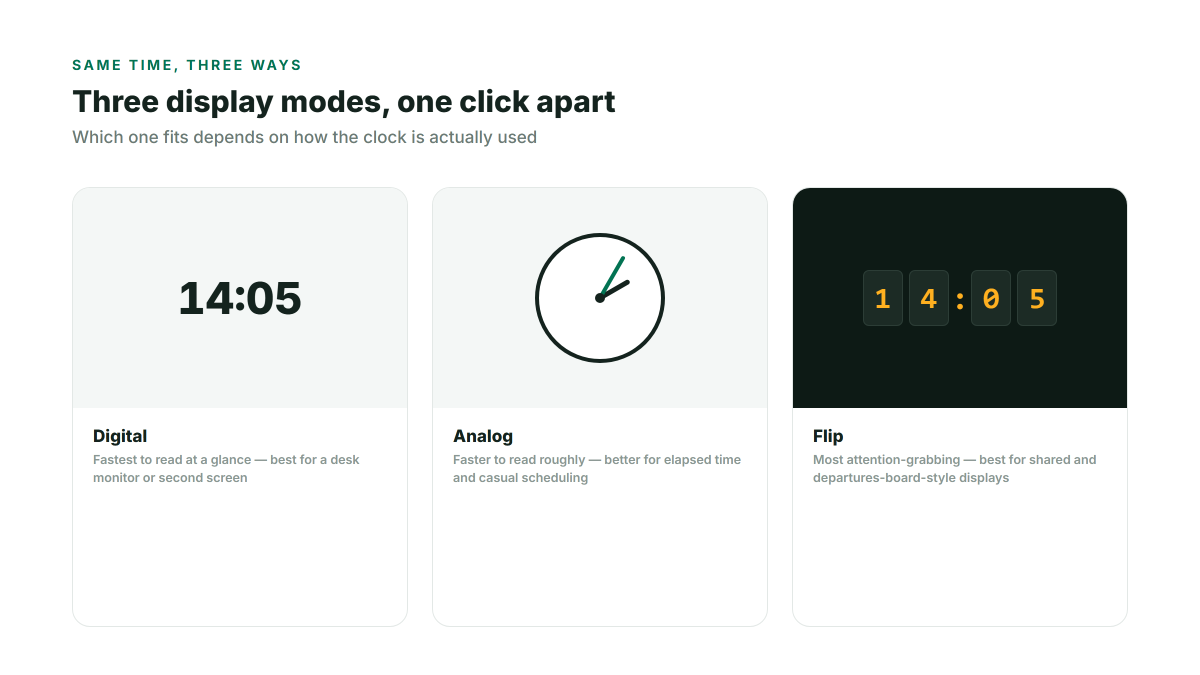
Digital: fastest to read at a glance
A plain digital readout is the quickest to parse from a distance or out of the corner of your eye, which makes it the right default for a work-desk monitor, a coding second screen, or anywhere you need the time without it competing for attention. It's also the quietest option visually — no moving parts, nothing animating every second — which matters if the display sits in your peripheral vision all day.
Analog: better for reading elapsed time and rough scheduling
An analog face is slower to read exactly ("3:47") but faster to read roughly ("about a quarter to four, forty minutes until my next meeting") — the position of the hands communicates how much time is left until a round number more intuitively than digits do. It also tends to suit a room where the clock is decorative as much as functional, like a shared space or a waiting area.
Flip: the most attention-grabbing, best for shared displays
The flip-card animation is the most visually distinctive of the three, and that's exactly what makes it work well for a departures-board-style display, a kiosk, or anything meant to be glanced at from across a room. The optional flip sound and hourly chime reinforce that it's a shared, ambient display rather than something meant to blend into a desk setup — both can be muted independently if you want the visual animation without the audio.
Switching doesn't lose your other settings
Colors, background, 12-hour or 24-hour format, and dark mode are independent of which of the three modes you're using — switch between digital, analog, and flip freely without having to redo your color scheme or background each time. Whatever mode and settings you land on are remembered automatically the next time you open the page.
Matching mode to quick preset
If you don't want to think through the choice manually, the built-in quick modes already pick a sensible display for common situations — Desk and Presentation default to digital for legibility, while Departures Board switches to the flip animation for its display-board look. See the Flip Clock setups guide for the full rundown of each preset.