How to Run the Pomodoro Technique with an Online Timer
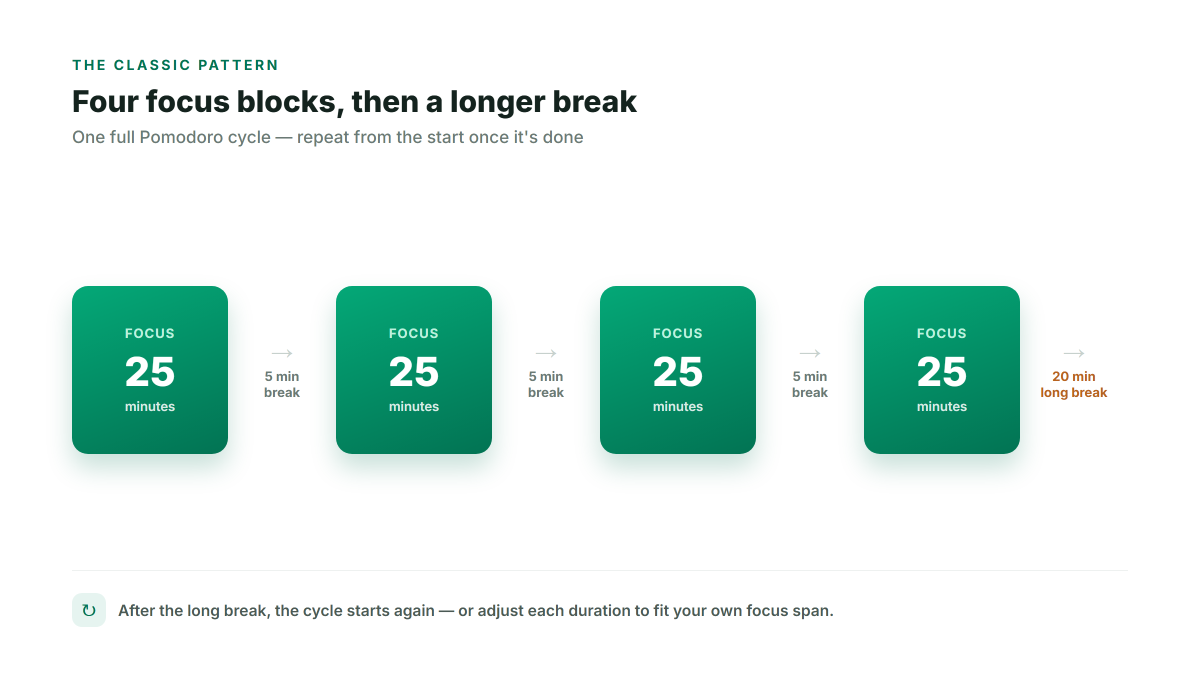
The Pomodoro Technique is a time-management method built around a simple idea: work in short, focused bursts with a real timer counting down, rather than working until you feel tired or distracted. The classic pattern is 25 minutes of focused work, a 5-minute break, and a longer break after every four rounds.
A timer that actually runs the cycle for you
Most free Pomodoro timers are a single countdown you have to restart by hand between every phase — set 25 minutes, it rings, you manually set 5 minutes for a break, it rings, you manually set 25 minutes again. Cronometro's Pomodoro timer runs the full cycle on its own instead: Focus → Short Break → Focus → ... → Long Break, automatically, in the order shown above — the only decision left is whether to work or rest.
Seeing your progress through the cycle
A row of dots below the timer fills in as you complete each focus session, so you can see at a glance how many blocks are left before your next long break — no need to count manually or lose track after a few rounds.
Getting notified without staring at the tab
You don't need to keep the tab in view for a phase to actually enforce itself:
- Browser notifications — click the bell icon once, and you'll be told the moment a phase ends even if you've switched to another window.
- Picture-in-Picture — float the timer in a small always-on-top window (in Chromium-based browsers like Chrome or Edge), useful if you're writing in a full-screen editor and still want the countdown visible in the corner of your screen.
A background sound while you focus
Turn on rain, ocean waves, a crackling fire, or a low focus drone in Settings — generated directly in your browser, so there's nothing to download and no ads or external player involved. It plays automatically during Focus phases and stops on its own once a break starts.
Adjusting the pattern to fit your own focus span
25/5/15 is a starting point, not a rule — change the focus length, short break length, long break length, and how many focus sessions happen before a long break, all in Settings. Prefer deeper, less-interrupted blocks? Try 50 minutes of work with a 10-minute break. Task easy to start but hard to sustain? 15-minute sprints work well too.
Reviewing how much focused time you actually logged
A small stats line above the timer shows how many pomodoros you've completed today and the total focus time across them — a quick, honest gut-check on whether today matched the plan, without needing a separate time-tracking app.